How To Find Help Link On Facebook
With Facebook, you would think they would make it easy to find the Help option. Nope, this monster company doesn't want it to be easy. On most websites you go to, there is an easy-to-locate link at the bottom or on the side that says, "Help", or "FAQ". This really grinds my gears (yes, I quoted Family Guy) about Facebook. Even this super-tech had some issues finding this hidden link, but with major searching, I finally found this "Help" option. Now it is time to share this knowledge so you don't have to stress out looking for it.
First: Log in to your Facebook account

Second: On the home page, to the left of the Chat Side-bar. Scroll down until you see the light colored wording "Facebook © 2016"
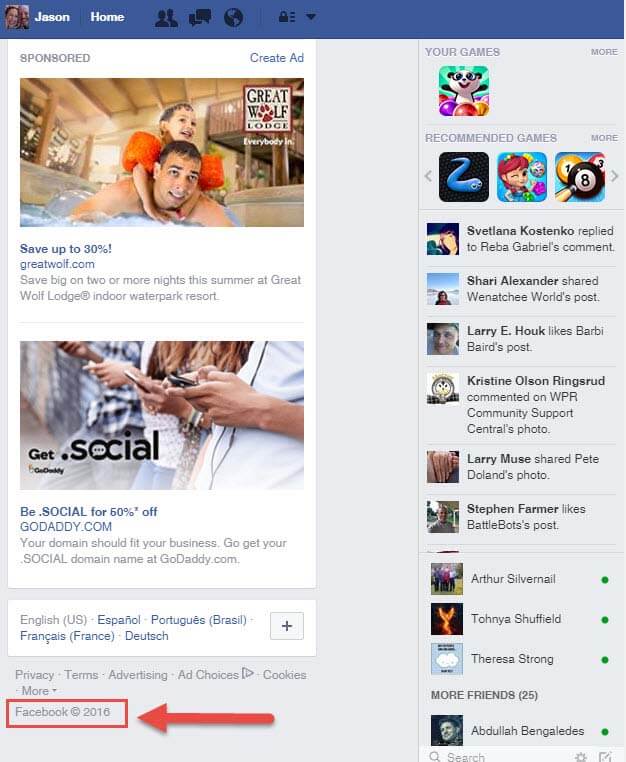
Third: Right above "Facebook © 2016", click on "More"
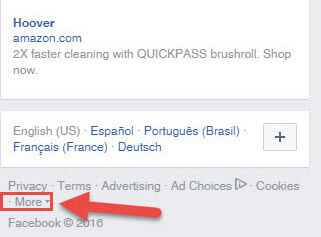
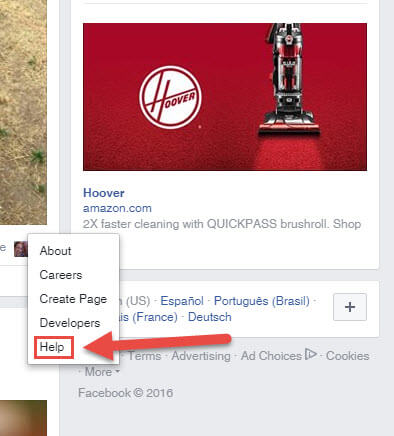
Fourth: This will bring up a menu with that helpful little link "HELP," click it
Fifth: Now you will be sent to the Help Center. (We found it!)
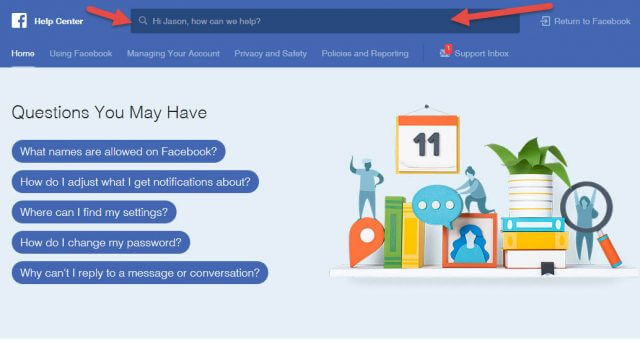
Here you can ask your questions in the search and hopefully find what you are looking for. Now share your knowledge with others. Finally, Facebook, if you are reading this article, please move this "Help" Link to an easier-to-find location.
If you have problems finding features or links in other social media sites let me know in the comments below. I would be happy to research it for you and write a "How To…" article for it.
—

Source: davescomputertips.com
Images credited to davescomputertips.com and mountainsfencing.com.au


Comments
Post a Comment